
Clarins - Skincare and Makeup
CLARINSBeauty
4.616.00 Reviews
- Version
- 1.4.0
- Installs
- 10.00K
- Age Rating
- Everyone
Screenshots


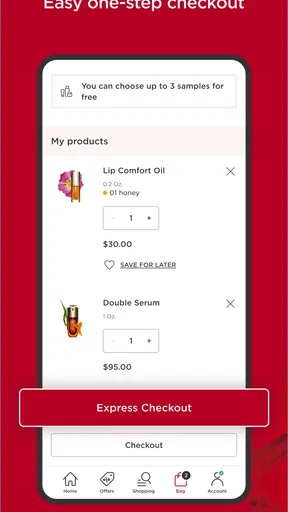

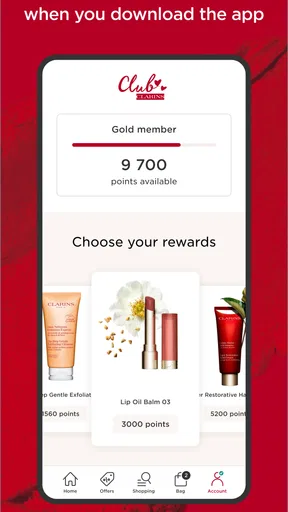
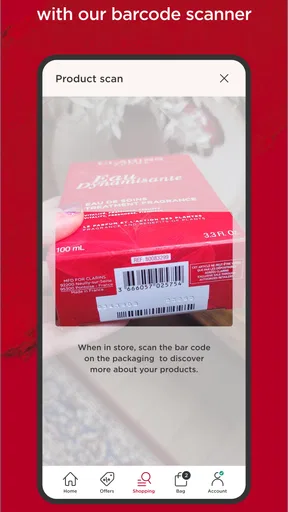
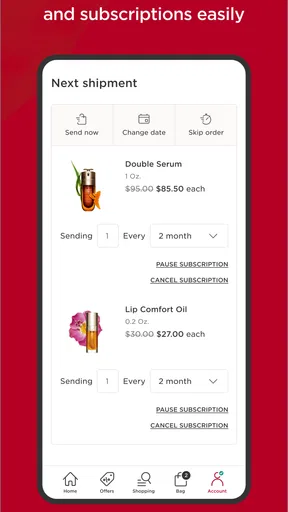

Our Review of Clarins - Skincare and Makeup
 Analysis by Appyee
I approached Clarins - Skincare and Makeup as a beauty companion rather than as a full replacement for a brand website or a personal consultation. The app comes from CLARINS and is free to use, with its main appeal centered on access to Clarins offers and member-style benefits from a phone. That sounds straightforward, but the practical experience depends heavily on how smoothly you move through setup, sign-in, browsing, and offer redemption.
My overall impression is positive, especially if you already buy Clarins products or want a more convenient way to keep up with the brand. The app has a focused purpose: it puts the Clarins shopping and loyalty experience closer at hand instead of making you begin from a browser every time. I would not install it expecting a complete skincare diagnosis, a detailed beauty course, or a universal product database. I would install it for easier access to the brand’s own ecosystem.
The app has an average rating of 4.6 from around 226 ratings, and it has passed 10 thousand installs. Those figures suggest a small but clearly interested audience rather than a mass-market beauty platform. It is rated for Everyone, and the listed minimum operating system is Android 7.0, which makes it accessible on many older phones as well as newer devices.
Where the real friction appears during everyday use
I find the everyday friction is less about the app’s purpose than about knowing when an offer is genuinely ready to use. Before relying on one, I’d open its details early, follow the displayed steps at an unhurried pace, and look for clear confirmation before treating the benefit as applied. That small habit makes the next question easier to judge: whether the convenience is worth keeping the app around.
Getting past the first screen
The first obstacle with an app like this is rarely the beauty content itself. It is usually the transition from opening the app to understanding what can be done without an account, what requires sign-in, and where offers are actually located. When an app is built around exclusive benefits, users naturally want to know whether they can browse first or whether they must register immediately. That distinction affects how comfortable the first session feels.
I recommend taking a moment to look around before entering personal details. Check the main navigation, identify the area that contains offers, and note whether product browsing is separate from account-related benefits. This small pause makes the app easier to understand and avoids the common mistake of assuming that every visible product card leads directly to a discount.
A second point of confusion can come from the difference between general brand information and an offer that is ready to use. A product page may help you decide what interests you, while a benefit may have its own conditions or redemption path. I would treat those as two separate tasks: first decide what you want, then confirm how the associated offer works.
Why a benefit may not feel immediately useful
Exclusive offers sound attractive, but their value depends on timing. If you are not planning to purchase Clarins products, installing a dedicated brand app may add little to your routine. On the other hand, if you are preparing a restock, comparing skincare items, or waiting for an appropriate gift, having the brand’s offers in one place can save repeated browser searches.
That is the first important trade-off: this is a focused app, not a general beauty bargain finder. It is useful when your decision is already close to the Clarins range. It is less useful when you want to compare several unrelated brands, search across retailers, or build a routine from a broad selection of alternatives.
Keeping expectations realistic
The name combines skincare and makeup, which may lead some people to expect a highly interactive beauty tool. In my view, the stronger reason to try it is the connection to Clarins benefits and offers, not the assumption that it will replace professional advice. Product discovery can support a purchase decision, but it cannot account for every allergy, treatment, skin condition, or personal preference.
The app works best as a convenient Clarins access point, not as a complete beauty adviser. That distinction matters because it helps you judge the experience fairly. If you want brand-specific convenience, it makes sense. If you want neutral recommendations across many companies, a retailer with a wider catalog or a specialist consultation service may suit you better.
Setup checks that prevent avoidable problems
Before troubleshooting anything complicated, I would check the basics. Make sure the phone is running a compatible version of Android, since the app supports Android 7.0 and later. If installation pauses or the app refuses to open, confirm that the device has enough free storage and that the connection is stable. These checks sound ordinary, but they solve a surprising number of first-session problems.
It is also worth checking whether the app itself is current. The current version is 1.4.0, so an older installation may behave differently from the latest release. If the app was transferred from an old phone or restored from a backup, updating it before judging performance is sensible. I would close other demanding apps, reopen Clarins, and test one simple action before trying to complete a longer account or offer workflow.
For a clean test, use a reliable Wi-Fi connection first. Mobile data can work perfectly well, but switching between weak networks while a page is loading makes it difficult to tell whether the issue comes from the app or the connection. If images or offer details appear slowly, wait for the page to finish rather than repeatedly tapping the same control.
How I would handle sign-in and account details
When a benefit is tied to an account, use the same email address and credentials you normally associate with your Clarins activity. A frequent source of frustration is creating a second account with a slightly different address and then wondering why expected information or benefits do not appear. If you already have a relationship with the brand, consistency is more useful than rushing through registration.
Keep the process simple: enter details carefully, check for typing errors, and avoid submitting the same form repeatedly when the screen is slow. If a confirmation message does not appear, give the app a moment and check whether the screen has changed before trying again. Repeated submissions can create confusion about which attempt succeeded.
I would also avoid testing an important offer for the first time at the exact moment I need to use it. Open the app earlier, sign in, browse to the relevant section, and make sure you understand the next step. This is particularly useful before a planned purchase or while traveling, when a weak connection or a rushed checkout can turn a minor delay into a real inconvenience.
Making browsing more efficient
Rather than opening the app without a goal, I found it more practical to decide what I am trying to do: check current benefits, investigate a product category, or prepare for a purchase. A clear purpose reduces aimless scrolling and makes it easier to notice whether the app is helping.
For skincare, I would begin with the concern or product type I already understand, then read the available information with a critical eye. For makeup, I would use the app to narrow down interest in Clarins products, but I would still consider shade, finish, and personal suitability outside the app if those details are important to me. The app can shorten the path to the brand’s products without removing the need for judgment.
Recovering when a page or offer does not load
If a section remains blank, my first recovery step would be to leave that screen and return once. If that fails, I would force-close the app, reopen it, and try again on a stable connection. This is safer than repeatedly pressing a purchase or redemption control, especially when the interface appears frozen but may still be processing a request.
When the problem affects only one page, I would test another area of the app. If other sections open normally, the issue may be temporary loading trouble rather than a complete failure. If every screen is affected, restarting the app and checking the connection becomes more meaningful. This simple comparison helps separate a local page problem from a broader access problem.
Clearing temporary app data can sometimes help with corrupted cached content, but I would use that step carefully and only after remembering any sign-in details I need. If the app offers a normal sign-out option, I would use that before taking more disruptive measures. Reinstalling should be a last resort, particularly when I am in the middle of an offer or need access to account information.
What to do when an offer does not behave as expected
First, reread the offer screen and make sure the action you are taking matches its wording. A benefit may require a particular route through the app rather than a general product search. I would avoid assuming that seeing an offer means it has already been applied. The safest approach is to follow the displayed steps in order and look for a clear indication that the benefit is active before continuing.
If the app returns to the previous screen, I would record what I was trying to do, restart the session, and attempt the process once more without rapidly tapping. If the result remains unclear, I would not rely on the discount until it is visibly confirmed. That may feel cautious, but it prevents an unpleasant surprise at the end of a purchase.
This is one of the app’s practical limitations: a focused offers app is only as reassuring as the clarity of its redemption flow. Convenience is valuable, but it does not remove the need to verify the final step. I would treat the app as a helpful access tool and keep the relevant offer details visible until the transaction is complete.
When the app is not the cause
Not every missing product image, delayed screen, or failed action points to a software defect. A weak connection, an overloaded phone, or a temporary service interruption can create identical symptoms. The quickest way to narrow things down is to compare behavior: try the app on a stronger network, restart the device, and see whether unrelated apps load normally.
Phone storage is another overlooked factor. Even when an app is already installed, a nearly full device can behave unpredictably when it needs to update or create temporary files. Removing unused downloads and restarting the phone is a sensible general check before blaming Clarins.
There is also a difference between an app problem and an expectation problem. If you are searching for independent reviews, a broad ingredient comparison, or alternatives from other brands, the Clarins app may appear limited simply because that is not its purpose. In that situation, a beauty retailer, ingredient reference, or dermatologist-led resource may be the better companion, while this app remains useful for brand-specific browsing and benefits.
A realistic everyday scenario
Imagine that I am nearly out of a familiar Clarins skincare product and want to decide whether to repurchase it. Instead of opening several browser tabs, I would launch the app, check the relevant product area, and then look for any current benefit connected with my planned purchase. I would do this a day or two before buying, not while standing at a checkout, so I have time to sign in, resolve any loading issue, and understand the redemption steps.
If I am buying a gift, I would use the same workflow but add a pause for suitability. A brand-specific offer may make the purchase more attractive, yet the recipient’s skin type, preferred texture, and makeup shades still matter more than a promotion. The app can help me organize the brand side of the decision; it cannot make the personal decision for me.
Who should install it
I think the app is a good fit for existing Clarins customers, people who regularly explore the brand’s skincare and makeup, and shoppers who value having offers close at hand. The free price removes the main financial barrier, and the Everyone rating makes it straightforward to consider for a household device.
It is also useful for someone who dislikes repeatedly searching a mobile website. A dedicated app can feel more direct when the goal is simply to check Clarins information or benefits. The current version, 1.4.0, is worth keeping updated so that the experience matches the version the developer currently maintains.
Who should skip it
I would skip it if I rarely buy Clarins products or if my priority is comparing many brands in one place. Installing a separate app for occasional curiosity may create more clutter than value. I would also choose another resource if I need medical skincare guidance, comprehensive ingredient analysis, or genuinely independent recommendations.
People who prefer to keep all shopping activity in a browser may not gain enough from the app either. Its advantage is convenience within the Clarins environment, so that advantage naturally shrinks when you do not use the brand often.
How it compares with usual beauty alternatives
Compared with a general beauty retailer, Clarins offers a narrower range but a more concentrated brand experience. A retailer is usually better for price comparisons, cross-brand routines, and seeing substitutes. Clarins is better when I have already decided that I want to investigate Clarins products and benefits specifically.
Compared with a browser, the app can make repeat visits feel more direct, but a browser remains more flexible for opening independent reviews, ingredient references, and competing products side by side. Compared with a professional consultation, the app is faster and more convenient, but it lacks the personal judgment that matters for sensitive skin or complicated concerns.
That comparison explains its place clearly. It is not trying to be the entire beauty-shopping internet. It is a focused tool for people whose next step already involves Clarins.
My practical verdict
After looking at the likely setup friction and the ways a session can recover from ordinary problems, I see Clarins - Skincare and Makeup as a useful but purpose-specific app. Its free access, brand-focused offers, and low operating-system barrier make it easy to try. The strongest benefit comes from using it before a planned purchase, when there is enough time to sign in, inspect the relevant section, and confirm how an offer should be used.
My advice is to install it with a clear reason rather than expecting a complete beauty platform. Keep the app updated, test important benefits early, avoid repeated taps during slow loading, and separate technical trouble from the simple fact that a brand app will not provide neutral comparisons. Those habits make the experience less frustrating and help you get the most from what it is designed to do.
CLARINS has created an app that makes sense for its existing audience. I would recommend it to a friend who already shops the brand or wants a convenient route to its skincare and makeup offers. I would not recommend it as the only beauty resource for someone seeking broad research or personalized clinical advice. Used within its proper role, though, it is a practical companion and a reasonable free download for Clarins customers.
Verdict
Strengths of Clarins - Skincare and Makeup
- Personalized product recommendations simplify choosing a routine.
- Detailed ingredient information supports more informed purchases.
- Virtual makeup options help preview selected shades before buying.
- Routine planning makes it easier to organize daily skincare steps.
- Exclusive app offers may provide savings on eligible Clarins products.
Limitations of Clarins - Skincare and Makeup
- Some features may require creating an account or sharing personal details.
- Product prices can be high compared with many competing skincare brands.
- Availability, shipping, and offers may vary by country or region.
- The app may feel less useful if you do not shop Clarins products.
- Some content and tools may depend on a stable internet connection.
Similar Picks in This Category
View All
Beauty Makeup Editor & Camera
Photo & Video Editors - Instant Solution4.7

Perfect365: Face Makeup Editor
Perfect365, Inc.3.5

Mirror Plus - HD Mirror app
Digitalchemy, LLC4.8

Cute Lock Screen & Wallpapers
Prometheus Interactive LLC4.6

HD Camera for Android
One Music Player4.5

Phone Mirror app - True Mirror
Cards4.6
Frequently Asked Questions
What is the Clarins - Skincare and Makeup app used for?
The Clarins - Skincare and Makeup app is designed to help you explore Clarins beauty products, including facial skincare, body care, makeup, and gift collections. You can browse product details, ingredients, usage instructions, and recommendations, while also checking current offers and purchasing selected items directly through the app or connected shopping experience.
Can I find skincare and makeup recommendations in the Clarins app?
Yes. The app makes it easier to discover products based on your beauty interests, such as hydration, anti-aging care, cleansing, sun protection, complexion makeup, or lip products. Depending on the available features in your region, you may also receive personalized suggestions, product routines, or guidance intended to help you choose items that better suit your skin concerns and preferences.
Can I buy Clarins products through the app?
In supported countries, the Clarins app or its mobile shopping experience allows you to view products, select sizes or shades, add items to a basket, and complete an order online. Availability of shopping, delivery options, payment methods, promotions, and loyalty benefits can vary by location, so it is worth confirming that the app is connected to your local Clarins store before ordering.
Does the Clarins app provide ingredient and usage information?
Product pages generally include useful information such as the product purpose, key benefits, directions for use, size, and ingredients. This can help you compare formulas before making a purchase. However, users with allergies, sensitive skin, or specific medical concerns should read the complete packaging information and consult a qualified professional, since cosmetic information should not replace medical advice.
Is the Clarins - Skincare and Makeup app free to download and use?
The app is generally free to download and use for browsing Clarins products, learning about routines, and accessing brand content. Costs may apply when you purchase products, pay for shipping, or use certain services offered through the app. Some features may also differ between Android and iOS or may not be available in every country, so check your local app listing.
